
Guide
Tradovate daily loss limit lock: set it in 6 steps
In short: Tradovate's Daily Loss Limit closes your trades and locks trading for the session, and the "Lock risk settings if trading is locked" box stops you from undoing it. Trading reopens at 6 PM ET. Set it well below your firm's limit, like $1,000 under a $3,750 cap. Full answer ↓
Also on X: the pinned TradeDesk HQ article with the same walkthrough.
The 30-second version
- Settings → Accounts → Risk Settings
- Loss protection → tick Daily Loss Limit
- Enter an amount well below your firm's limit
- Risk settings lock → tick Lock risk settings if trading is locked
- Save
Hit the limit and Tradovate closes your positions and locks trading on that account until the next session at 6 PM ET. With the lock ticked you can't raise the limit or switch it off while you're on tilt (trading on emotion after losses).
Same bad day, three settings
2, 4, then 8 MNQ, each stopped 150 points lower, on a $5,000 trailing drawdown:
| Daily Loss Limit | Day stops at | Room left |
|---|---|---|
| No limit ticked | -$4,200 | $800 |
| Firm cap $3,750 | about -$3,750 | ~$1,250 |
| $1,000, locked | about -$1,000 | ~$4,000 |
$2,750 buffer between a $1,000 limit and the $3,750 firm cap: an exit would have to fill 1,375 points past your limit on 1 MNQ, 137.5 points on 1 NQ, or more than 170 points on 8 MNQ before the firm cap is touched.
Set it up in 6 steps
Open Risk Settings on the account you trade
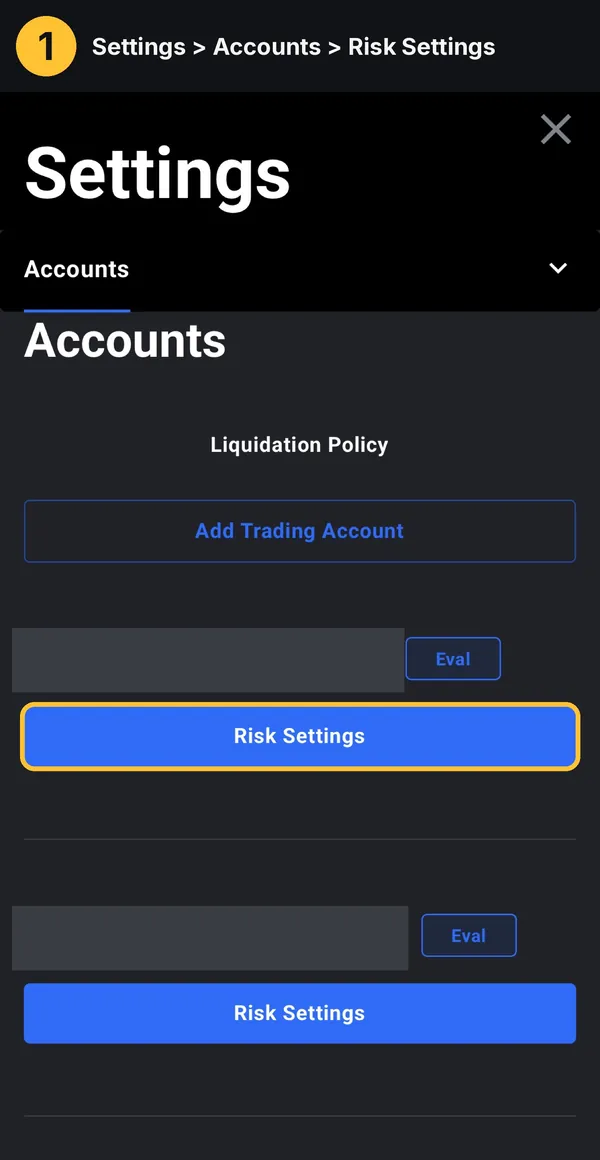
Settings → Accounts → Risk Settings. The setting is per account, so repeat it on every account.
Open Loss protection
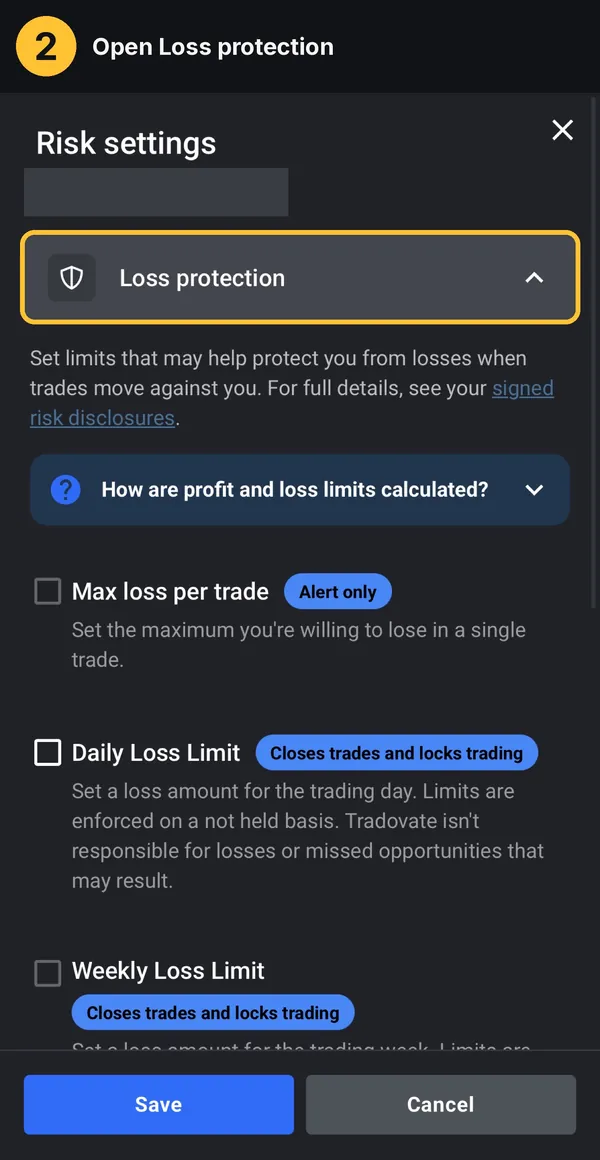
Max loss per trade is Alert only. Daily Loss Limit is the one that closes trades and locks trading.
Tick Daily Loss Limit and enter your amount
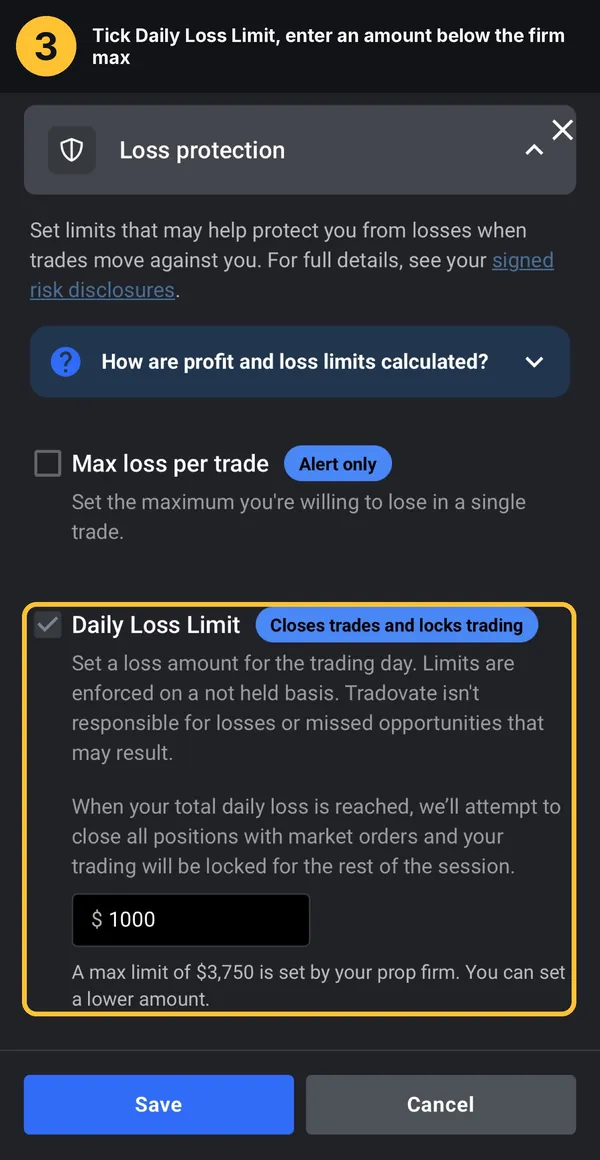
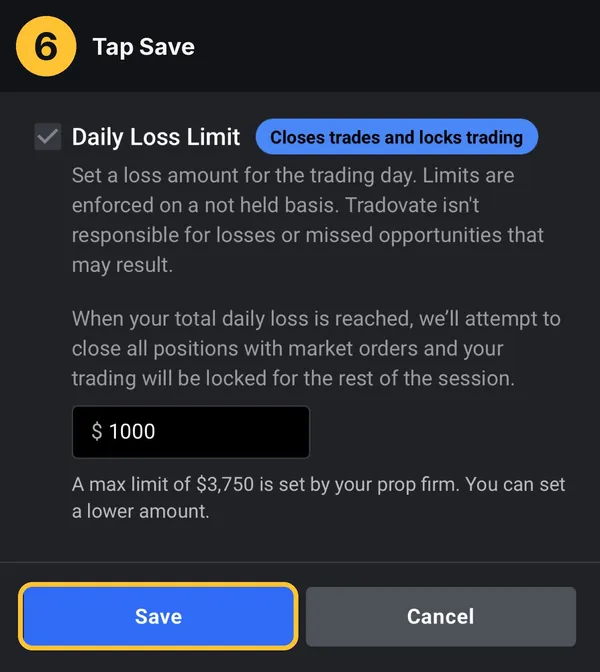
Pick a number below the firm cap shown under the box. "A max limit of $3,750 is set by your prop firm. You can set a lower amount." Never leave it at $0.
Optional: Weekly Loss Limit
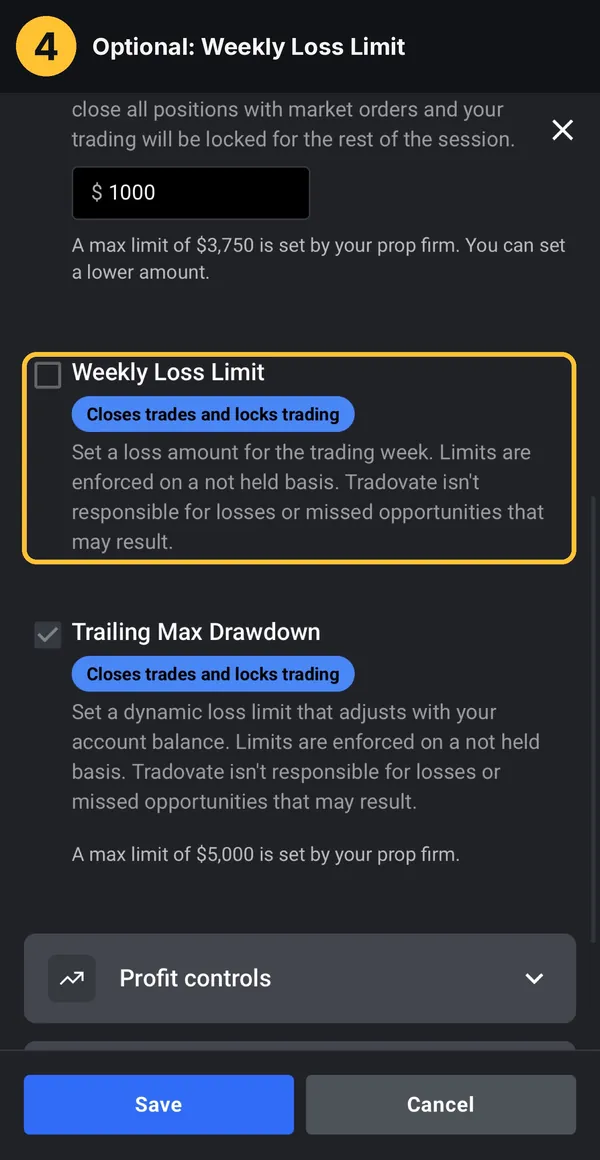
If you use it, set it below three of your daily limits.
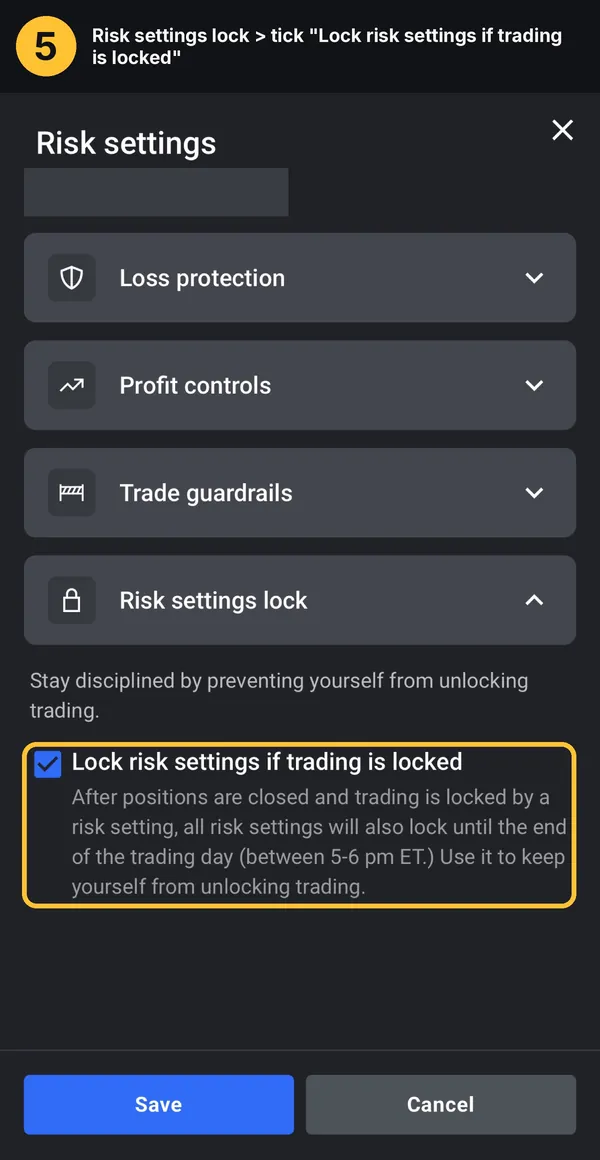
Tick the lock
Risk settings lock → Lock risk settings if trading is locked. This is the step that matters: without it the limit can be raised or turned off after it hits.
Save, then check
Save, reopen Risk Settings and make sure both boxes stayed ticked.
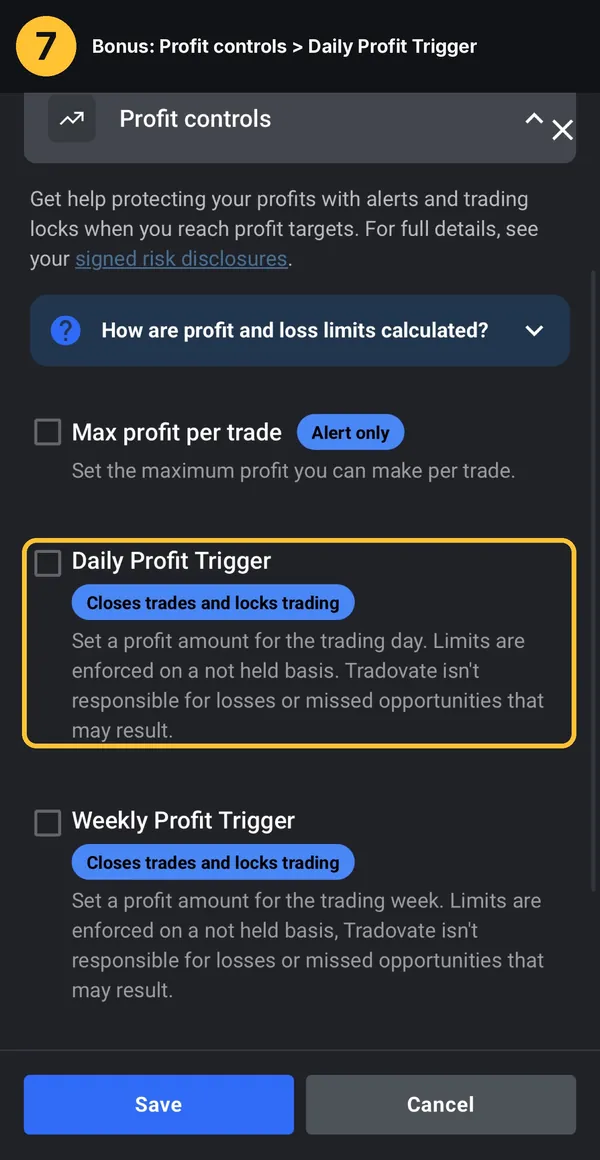
Bonus: Daily Profit Trigger under Profit controls carries the same Closes trades and locks trading badge, for traders who tend to give back their morning gains.
How big should your limit be?
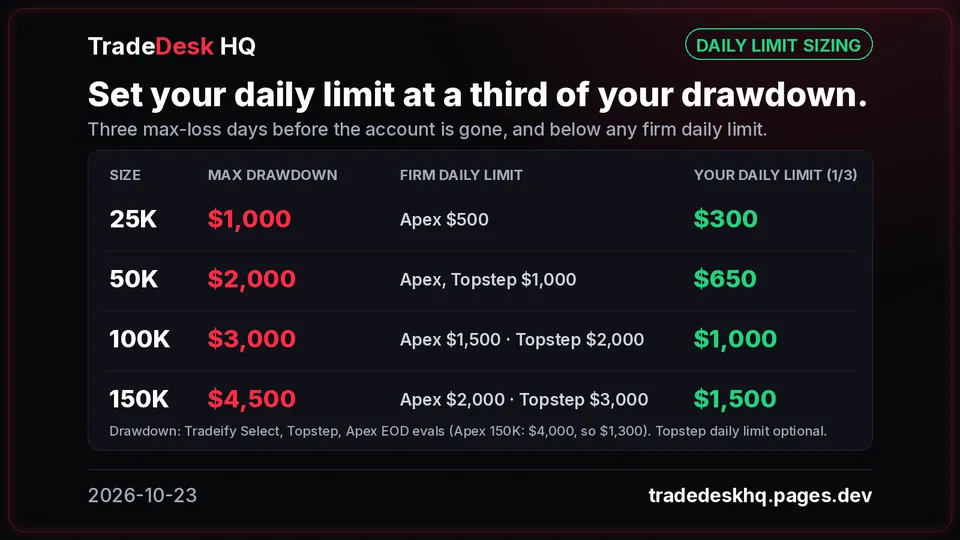
A third of your max drawdown, and always below any firm daily limit.
Tradovate vs Rithmic: set it vs lock it
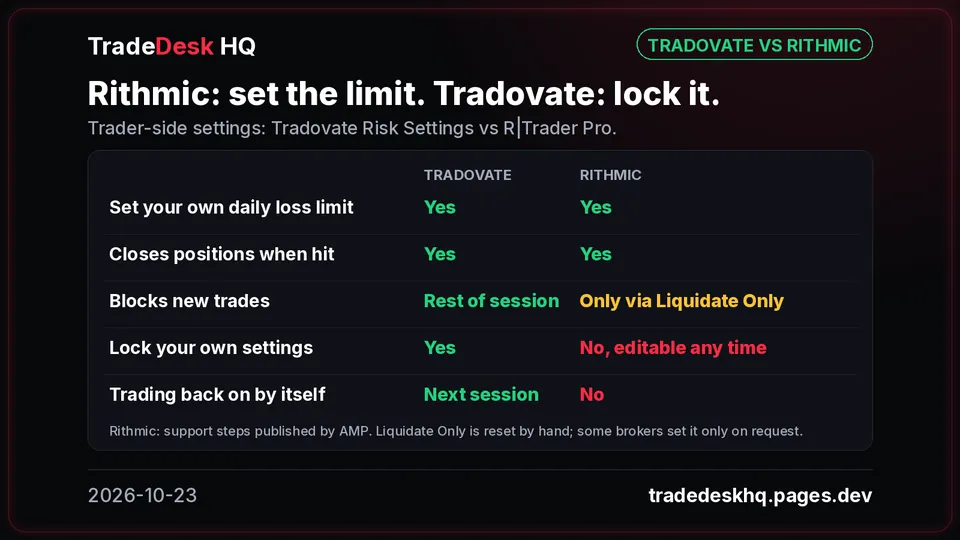
On Rithmic you can set an Auto Liquidate loss limit, but the trader can change it at any time. On Tradovate you can lock it, and it resets on its own at 6 PM ET.
Read the details
The short answer
Tradovate lets you set your own Daily Loss Limit on each account under Settings → Accounts → Risk Settings → Loss protection, and lock it by ticking "Lock risk settings if trading is locked" under Risk settings lock. When the limit hits, Tradovate tries to close every position with market orders, cancels working orders and locks trading on that account for the rest of the session; with the lock ticked you can't raise the limit or switch it off either. Trading reopens at 6 PM ET, when the next session starts. Set it well below your prop firm's limits (example: $1,000 under a $3,750 firm cap leaves a $2,750 buffer) and a one-day blowup becomes practically impossible.
FAQ
When does a locked Tradovate account reopen?
At the start of the next trading session, 6 PM ET. The daily reset runs in the 5-6 PM ET break, and no new position can be opened on that account before then.
Can I undo the Tradovate daily loss limit after it hits?
Not if you tick "Lock risk settings if trading is locked". Without the lock, Tradovate's own Daily Loss Limit page says a locked account can be unlocked at any time by raising the limit or turning it off.
What happens if I save the Tradovate daily loss limit at $0?
Tradovate's support page says saving a risk setting to $0 liquidates your positions and cancels open orders, so always enter an amount.
Does Rithmic have a daily loss limit lock like Tradovate?
Rithmic lets you set Auto Liquidate with a Loss Limit in R|Trader Pro, but Rithmic support's steps say these values can be changed at any time, and the Liquidate Only flag must be reset manually the next day.
Why one red day turns into a dead account
On Oct 22, 2026, Nasdaq-100 futures fell 960 points from high to low and settled 865 points down. Buy the dip with 2 MNQ, stopped 150 points lower: -$600. Double to 4 MNQ, stopped again: -$1,200. Double to 8 MNQ, stopped again: -$2,400. Three entries, 450 points, -$4,200. On a $5,000 trailing drawdown that leaves $800, and one more click ends the account. The first loss is in the plan; the re-entries aren't. The buy button still works while you're on tilt, so the fix has to be set before the open and enforced by the platform.
The math with a $1,000 locked limit
On the TradeDesk HQ prop evaluation in the screenshots below, the firm caps the Daily Loss Limit setting at $3,750 and sets the Trailing Max Drawdown at $5,000; both are shown on the Risk Settings screen. The limit is set at $1,000. Same three entries at $2 per point on MNQ: with no limit ticked the day ends at -$4,200 with $800 of room left. At the firm cap the day stops at about -$3,750 on the third entry, with about $1,250 left. With $1,000 locked the day stops at about -$1,000 on the second entry and about $4,000 is left, so 80% of the account is still there tomorrow. It takes five of those worst days to lose $5,000, versus two at the cap. On full-size NQ at $20 per point, 1 contract over the same 450 points is -$9,000, so the limit matters more as size goes up.
The buffer: why a one-day blowup becomes practically impossible
The gap between a $1,000 personal limit and the firm's $3,750 cap is a $2,750 buffer. Exits are market orders, but one would have to fill 1,375 points past your limit on 1 MNQ, more than 170 points past it on 8 MNQ, or 137.5 points past it on 1 NQ before the firm cap is even touched. Set the limit well below the firm's limits, on every account, before the open, and a one-day blowup becomes practically impossible.
How big should your limit be?
A simple rule: a third of your max drawdown, and always below any firm daily limit, so the market has to beat you on three full days before the account is gone. Suggested daily limits by account size, from the published evaluation rules of Tradeify, Topstep and Apex: 25K $300, 50K $650, 100K $1,000, 150K $1,500. If your drawdown trails, your room shrinks as the floor moves up, so size the limit off today's room, not the starting number.
The setup in 6 steps
The whole path takes about 30 seconds. Step 1: Settings → Accounts → Risk Settings on the account you trade; the setting is per account, so repeat it for every account. Step 2: open Loss protection; Max loss per trade is Alert only and closes nothing, while Daily Loss Limit says Closes trades and locks trading. Step 3: tick Daily Loss Limit and enter an amount below the firm cap shown on screen ("A max limit of $3,750 is set by your prop firm. You can set a lower amount."); never leave it at $0, which Tradovate's support page says liquidates your positions. Step 4 (optional): Weekly Loss Limit, set below three of your daily limits. Step 5: open Risk settings lock and tick "Lock risk settings if trading is locked"; this is the step that matters. Step 6: Save, then reopen Risk Settings and check both boxes stayed ticked. Bonus: Daily Profit Trigger under Profit controls carries the same Closes trades and locks trading badge, for traders who tend to give back their morning gains.
What happens when the limit hits
Tradovate attempts to close all positions with market orders and cancels working orders. Trading on that account is locked for the rest of the session, and with the lock ticked every risk setting is frozen too; Tradovate says its representatives can't unlock them. Trading reopens at 6 PM ET when the next session starts (the reset runs in the 5-6 PM ET daily futures break). You aren't logged out and can still watch the chart; you just can't open a new position on that account. Tradovate staff have said the limit runs server-side, so it doesn't depend on your chart or app staying open.
What it doesn't do
Limits are enforced on a "not held" basis: the exit is a market order, so no price is guaranteed and the fill can land a little past your number. That is why the buffer matters. The lock only freezes settings after trading is locked, so set the limit before the open and leave it alone during the session. It's per account: another account, or a new evaluation, can still trade until you set it there too. Your limit sits on top of the firm's rules, and firms control what you can see: traders reported the lock missing on some prop accounts in mid-2026. If you don't see the checkbox, ask your firm.
Tradovate vs Rithmic for prop accounts
Many firms make you pick a platform at checkout. Tradeify, Apex, Take Profit Trader and Lucid offer both Tradovate and Rithmic; Bulenox is Rithmic only, and MyFundedFutures lists Tradovate but not Rithmic. Topstep runs its own TopstepX, whose Personal Daily Loss Limit has a Liquidate and Block option. Rithmic does let you set Auto Liquidate with a Loss Limit under Risk Parameters set by Trader in R|Trader Pro, but Rithmic support's steps, published by AMP, say these values can be changed at any time, and the Liquidate Only flag that blocks new trades must be reset manually; it doesn't turn trading back on the next day. On Rithmic you can set the limit. On Tradovate you can lock it, and it resets on its own.
Sources (12)
- https://ninjatrader.my.site.com/tradovate/s/article/Risk-Settings-Tradovate
- https://www.tradovate.com/daily-loss-limit/
- https://community.tradovate.com/t/server-side-daily-loss-limit/1036
- https://faq.ampfutures.com/hc/en-us/articles/34496648178327-Rithmic-How-to-Set-Daily-Loss-Limit
- https://help.topstepx.com/settings/risk-settings/personal-daily-loss-limit
- https://help.tradeify.co/en/articles/10468221-supported-platforms
- https://support.apextraderfunding.com/hc/en-us/articles/31318568303259-Choosing-the-Right-Platform
- https://takeprofittraderhelp.zendesk.com/hc/en-us/articles/15173017163549-Choosing-Your-Platform
- https://support.lucidtrading.com/en/articles/11404614-lucid-trading-supported-platforms
- https://bulenox.com/help-center/connection
- https://help.myfundedfutures.com/en/articles/8528335-overview-of-supported-platforms-at-mffu
- https://x.com/TradeDeskHQ/status/2113652367249854655